



A good AI 3D model can still fail as a 3D print. That gap between “looks good on screen” and “prints successfully” is usually where most AI 3D tools start to break down. When I look at a platform like Hi3D, the first thing that actually matters is how far it can go after generation - whether it can get through print prep without sending me back into Blender or Meshmixer.
Hi3D seems to go beyond just model generation and instead focuses on the harder part of the Maker workflow: helping users move from a digital idea to something that has a better chance of becoming a physical print.
Built Around Real 3D Printing Problems
The strongest part of Hi3D is that it clearly understands the weakest stage of most AI 3D workflows: slicer and print prep. A model may be too large for the printer, have mesh issues, need awkward supports, or become difficult to assemble after printing.
From what I can see in the workflow, Hi3D addresses those issues through a full model-to-print process. It covers:
AI generation > mesh repair > auto character splitting > connector generation > tolerance control > multi-color planning > smart build-plate layout > 3MF export > slicer handoff.
Because these features sit in one continuous workflow, users are less likely to generate a model and then spend the rest of the project fixing it manually in Blender, Meshmixer, or the slicer. For that reason, Hi3D feels more useful for people who actually print models, especially figure makers, hobbyists, Bambu AMS users, print services, and small studios.
Auto Character Split Is the Main Highlight
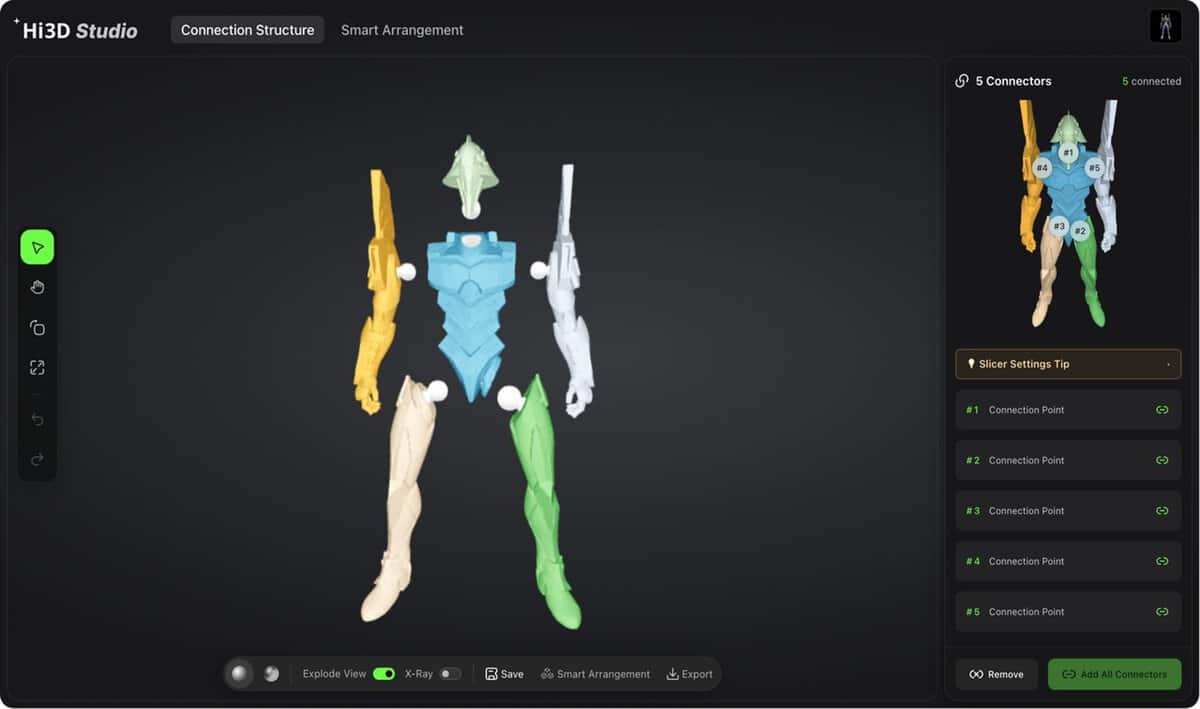
Auto Character Split is probably the feature you would check first if you are using Hi3D for a figure or character model. Large characters are rarely convenient to print as one piece. They may not fit on the build plate, and even if they do, the support cleanup can easily damage visible details like faces, armor, clothing folds, or accessories.
Simply cutting a model into smaller parts would not be enough. A bad split can create just as much work as no split at all. Hi3D is designed to divide the character into recognizable printable sections, such as the head, torso, arms, legs, and accessories, while keeping the result closer to a real model kit instead of a broken mesh.
The practical test is whether the split parts can still pass through slicing cleanly. If the parts look separated but fail in the slicer, the feature has not really solved the problem.
I also like that the split workflow is aimed at users who do not want to spend extra time cutting parts manually in Blender, Meshmixer, or other modeling software. Skilled modelers may still want to decide exactly where to cut the model and how each connector should behave. But for hobbyists and figure creators, getting a clean set of printable components is already a big step toward turning a digital character into something that can actually be assembled.
Connector Generation Turns Parts Into Functional Kits
A split model is only useful if the pieces can fit back together cleanly. This is why connector generation matters. Hi3D can generate snap-fit joints, mortise-and-tenon joints, locating pins, and ball joints during the split stage.
For display figures, this means cleaner alignment after printing. For dolls, toys, or mecha models, ball joints also make the model feel less like a static object and more like an assembled kit.
These connectors are built into the split geometry rather than treated as an afterthought, which makes the feature feel practical rather than decorative.
The Tolerance System Helps Reduce Failed Fits
Tolerance is one of those small details that can ruin an otherwise good print. A connector can look perfectly matched in the digital file. Once filament behavior, nozzle size, layer height, and printer calibration come into play, the actual fit can change quickly.
Hi3D can generate connector clearances automatically, while still letting users adjust connector size, direction, length, and fit when needed. That kind of control matters before sending a split figure to print. A joint that is too loose makes the final model feel cheap; one that is too tight can crack the part during assembly.
I would still expect some trial and error for demanding projects, especially articulated figures, but having tolerance controls inside the workflow is much better than discovering the problem only after wasting filament on a failed test print.
Multi-Colour Printing Feels More Practical
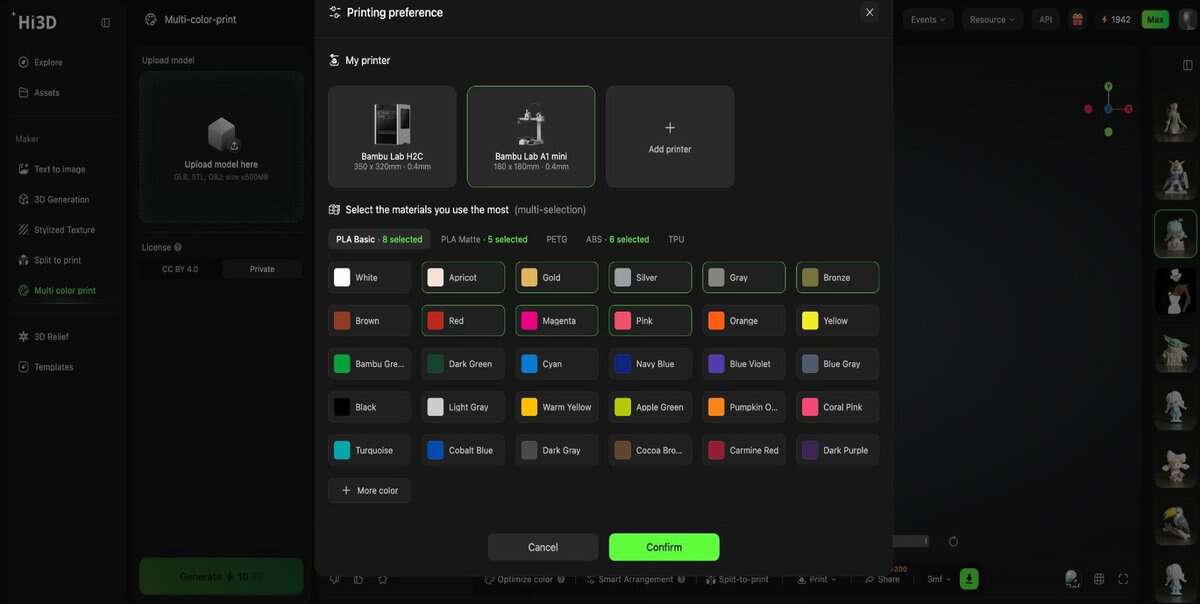
Multi-colour printing looks exciting in previews. In a real FDM workflow, it can get annoying fast. The hard part is keeping the colour regions clean enough to print without creating endless filament swaps, extra waste, or a messy slicer setup.
Hi3D’s colour-to-print workflow feels useful here because it uses both model structure and texture to create cleaner colour regions, so users do not have to paint every area manually in the slicer. It can generate structured colour partitions, support 1–16 colour configurations for AMS and multi-material setups, and reduce fragmentation by merging overly small colour regions that would otherwise lead to more filament swaps and waste.
I would care more about getting clean, printable colour zones than chasing every small colour detail. Hi3D’s filament colour preview also helps set more realistic expectations, because screen colours and real filament colours rarely match perfectly. For multi-colour figures or collectibles, that makes the workflow feel more practical, not just more visually impressive.
Smart Layout Supports Better Print Success
Smart layout may not sound as exciting as auto-splitting or multi-color printing, but I would not skip over it. In 3D printing, orientation can decide whether a model comes out clean or turns into a support-removal problem.
Hi3D’s Surface-First Mode makes sense for figures, armor, faces, props, and other detail-heavy models. If supports end up on the wrong side, the print may technically succeed while the finished surface still looks damaged. Low-Support Mode is more practical when the priority is saving material, reducing cleanup, and avoiding unnecessary support structures.
Hi3D supports export to Bambu Studio, OrcaSlicer, Creality Print, and Elegoo Slicer, which helps keep the model, layout, and print-prep decisions in one continuous path.
Maker Templates Help Beginners Start Faster
Maker Templates feel like the most beginner-friendly part of Hi3D. Not everyone who is interested in 3D printing wants to start by learning modeling software or writing detailed prompts. Some users just want to make something personal first, a pet figurine, a small keychain, a chibi-style portrait, or a simple collectible.
I can see why Hi3D includes this feature. Instead of asking beginners to understand the whole 3D workflow from the beginning, Hi3D gives them a more direct starting point: upload a photo, choose a template, and get a printable object that already has a clear use case.
I don't think this is the platform's most advanced feature, but it may be one of the easiest ways to bring new users into 3D printing. People are more likely to finish a first project when the result feels personal rather than generic.
Final Verdict

Hi3D reflects where AI-powered 3D creation is heading next. Rather than competing only on visual quality, the platform focuses on closing the gap between AI-generated models and real-world manufacturing—helping creators move from generation to printable, production-ready assets with far less manual work.
The next milestone is already on the horizon. Hi3D 3.0 is set to launch soon, introducing what the company describes as the industry's first 2048³ ultra-high-precision AI 3D model generation. With significantly higher geometric fidelity and richer surface detail, it aims to bring AI-generated models even closer to manufacturing quality.
At the same time, Hi3D is expanding beyond standalone software through partnerships with leading digital manufacturing brands, including Creality, Bambu Lab's MakerWorld, and xTool. By combining AI-native 3D generation with established 3D printing and digital fabrication ecosystems, Hi3D is helping creators move from a single image or prompt to a finished physical product in just a few minutes—pointing toward a future where AI becomes a native part of the entire maker workflow.


Discussion